

Think of your website as a map and your pages as destinations. The internal linking between them is what guides visitors and search engines along the right paths. When those paths are broken, hard to follow, or incomplete, your best content can stay hidden. That’s where an internal link audit comes in; it’s the process of checking and improving those connections so your site works better for people and search engines alike.
Whether you’re managing a large site or doing internal linking in WordPress, this kind of review helps you spot broken links, uncover missed opportunities, and ensure every important page gets the attention it deserves. With the right approach and the right internal link audit tool, you can create a site structure that’s both user-friendly and SEO-friendly.
In this guide, you’ll learn exactly how to run an internal linking audit, why it matters, and how to apply internal links SEO best practices so your site stays healthy. By the end, you’ll see just how important internal links are for SEO, and you’ll have a clear plan to keep them working in your favor.
What is an Internal Link Audit?
An internal link audit is a detailed review of all the pathways that connect your web pages. These connections, known as internal links, guide visitors around your site and help search engines understand the relationship between your content. When done well, they make navigation smooth and improve visibility in search results.
Running an internal linking audit means checking every link to see if it works, points to the right place, and uses clear, relevant anchor text. If you’re handling internal linking in WordPress, it’s about making sure your menus, blog posts, and product pages all link together in a logical way.
With the help of an internal link audit tool, you can quickly identify broken links, orphan pages, and missed linking opportunities. This process is a core part of internal links SEO best practices, and it’s one of the easiest ways to show search engines exactly how important internal links are for SEO success.
Why Internal Link Audits are Important?
A well-structured network of internal links is one of the most overlooked but powerful elements in SEO. Running an internal link audit helps ensure those connections are doing their job; guiding visitors, distributing authority, and making your content easier to find.
Here’s why this matters:
- Shows exactly how important internal links are for SEO by helping search engines understand your site’s hierarchy and relationships.
- Improves user experience by connecting related content naturally, keeping visitors engaged longer.
- Distributes page authority, a key part of internal links SEO best practices, so important pages get more visibility.
- Helps identify hidden or orphan pages during an internal linking audit so they can be brought into the site’s navigation.
- Keeps your linking structure clean and updated, which is crucial for sites doing internal linking in WordPress or any other platform.
Whether you’re using a professional internal link audit tool or doing it manually, this process directly supports better rankings and a smoother browsing experience.
Preparations Before the Audit
Before starting an internal link audit, it’s worth gathering the right tools and information. A little preparation makes the process smoother and ensures your internal linking audit is accurate.
- Use an internal link audit tool like Screaming Frog, Ahrefs, or a WordPress plugin to scan your site.
- Check Google Search Console for crawl errors and missing pages.
- Keep a list of your most important pages, especially those you want to rank higher, so you can apply internal links SEO best practices to them first.
- Download your XML sitemap to compare against the actual site crawl.
- Gather your target keywords to check if anchor texts match your SEO goals.
- If you’re doing internal linking in WordPress, note any menu structures or widgets that might influence linking.
With these basics ready, you’ll save time and uncover exactly how important internal links are for SEO writing in your own site’s performance.
How to Perform an Internal Link Audit?
A successful internal link audit follows a clear, methodical process. Whether you’re managing a large corporate site or doing internal linking in WordPress, these steps will help you optimize your structure.
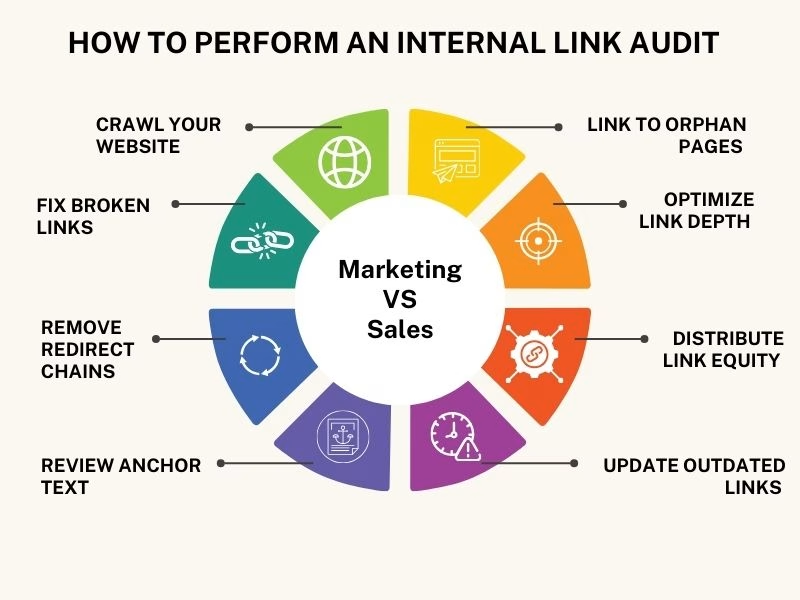
Crawl Your Website
Start your internal link audit with a full site crawl using an internal link audit tool such as Screaming Frog, Ahrefs, or a dedicated WordPress plugin. Gather data on all internal links, their source pages, destination URLs, anchor text, and status codes.
Fix Broken Links
Identify any broken or incorrect links during your internal linking audit and update them to improve navigation and SEO performance.
Remove Redirect Chains
Check for redirect loops or long chains and replace them with direct links. This keeps internal linking in WordPress and other platforms fast and efficient.
Review Anchor Text
Follow internal links SEO best practices by making sure anchor texts are descriptive, keyword-relevant, and natural. Avoid repetitive or generic text like “click here.â€
Link to Orphan Pages
Locate orphan pages, those without any internal links, and connect them to relevant, high-authority pages. This step highlights how important internal links are for SEO and user discovery.
Optimize Link Depth
Ensure that key pages are no more than three clicks from the homepage. Shallow link depth improves both user experience and crawlability.
Distribute Link Equity
Pass authority from high-traffic pages to underperforming ones by linking strategically. This is a cornerstone of internal links SEO best practices.
Update Outdated Links
Replace outdated URLs with current, relevant content to keep your site’s internal linking fresh and valuable.
Following this process ensures your internal linking is both user-friendly and search engine-friendly, paving the way for better visibility and engagement.
Best Practices for Internal Linking
A solid internal linking strategy is about making every connection purposeful. An internal link audit ensures your site is easy to navigate, user-friendly, and optimized for search engines. Following these internal links, SEO best practices keep your website organized and boost performance.
- Keep URLs short and descriptive so both visitors and search engines understand the content.
- Use natural, keyword-rich anchor text that aligns with your internal linking audit goals.
- Link from high-traffic pages to important or underperforming pages to distribute authority.
- Maintain a logical site hierarchy, so users can move easily from general topics to detailed content.
- Avoid adding too many links in one place; relevance matters more than quantity.
- Place links where they make sense within the content for a smooth reading experience.
- Keep navigation elements like menus, breadcrumbs, and categories consistent, especially when doing internal linking in WordPress.
Implementing these practices as part of a regular internal link audit will make your site more engaging, easier to explore, and better optimized for search engines, showing just how important internal links are for SEO.
Tracking and Continuous Improvement
Regularly monitoring your internal links is essential to keep your site healthy and fully optimized. An internal link audit isn’t just a one-time task; it’s an ongoing process that ensures every page remains connected and valuable for both users and search engines.
- Schedule regular internal linking audits to catch broken links or outdated references early.
- Use an internal link audit tool to track errors, missing links, and orphan pages efficiently.
- Monitor traffic and rankings to see how your internal links’ SEO best practices are affecting performance.
- Keep high-priority pages well-linked from popular content to maintain visibility and authority.
- Update links whenever you add new content to integrate it into your existing internal linking in WordPress structure.
- Remove or fix outdated links to maintain a clean and navigable site.
By continuously tracking and improving your internal links, you reinforce your site’s structure, improve user experience, and demonstrate how important internal links are for SEO. A consistent internal link audit ensures your website stays optimized and search engine-friendly over time.
Conclusion
An internal link audit is a simple yet powerful way to improve your website’s structure, user experience, and search engine performance. By regularly reviewing and updating your links, following internal links SEO best practices, and using an internal link audit tool, you make it easier for visitors to navigate your site and for search engines to understand your content.
Whether you’re doing internal linking in WordPress or managing a larger platform, knowing how important internal links are for SEO helps you prioritize key pages, fix broken links, and distribute authority effectively. Treating internal linking as an ongoing process ensures your website stays organized, engaging, and optimized over time.
FAQs
1. What is an internal link audit?
It’s the process of reviewing and optimizing internal links to improve site structure and SEO.
2. Why is an internal link audit important for SEO?
It helps search engines crawl pages better and boosts keyword rankings.
3. How often should I conduct an internal link audit?
At least twice a year or after major website changes.
4. What tools can help in an internal link audit?
Tools like Screaming Frog, Ahrefs, and SEMrush make the process easier.
5. Can internal link audits improve user experience?
Yes, they guide users to relevant content and reduce bounce rates.









Leave a Comment